

As an independent contractor (i.e. not employed by us) you must complete invoices via the following templates.
Please note that some of the downloads on this page are password protected. We will send you a password if you need it.
The following form covers:
*Including online work which is part of the above courses
Click here to download the invoice template for the above courses.
This invoice template is only for online tuition which is not part of a half term, May weekend, or residential course.
Click here to download the invoice template for year-round/online work.
Click here to download the instructions specific to this invoice.
Click here to download the payment schedule for 2026. Please note that this schedule is only for year round work.
If you have written a blog for us, or similar work, please use the invoice template below.
Click here to download the invoice template for blog/content work.
First download the form (see above links) and have a look at it, otherwise the explanation below won’t make much sense.
I strongly recommend that you complete the invoice in 2 stages.
Important note: please only add data to the pink boxes – editing other bits of the form will most likely delay payment.
Use the downloaded form to create a re-useable form – i.e. add the information, like your address, that will be the same every time you submit an invoice.
Complete the following:
Tutor ID: your ID will be something like NDS123, if you know this please add it, if not just leave blank.
Account name: this will usually be your name (or a company name) – not the name of the bank.
Account number: this must be an 8-digit number – please include leading zero(s) if any.
Sort code: six digits – you can include gaps or dashes if you wish.
If it is not a UK account give IBAN as account number and SWIFT/BIC as sort code. We don’t need the IBAN etc for UK accounts.
Phone number: so that you can be contacted if there is an issue. Without this, issues may take longer to resolve.
Your name: exactly what you’d expect!
Invoice from:
1st line should be your name unless you are being paid as a company in which case it is the company name. If you are not sure about this then you’ll be a person rather than a company.
Lines 2 to 5 are your address or company address.
Company number: if you are operating as a company please give company registration number – if not leave blank.
Save the spreadsheet now – you will be able to re-use this for all future invoices without having to re-enter the above data.
Invoice number: this can be any number but it must not be the same as any number you have used before. You can just number them 1, 2, 3 etc. however (obviously) you will need to keep track of these numbers. You could simply use the course code – F26 which means February 2026. Alternatively, you could use the date in the following format: 29102025 (not 29/10/25 as that would cause issues).
Invoice date: the date you send the invoice to us.
Course: something like “February half term 2026” – this needs to be clear as to which course, so things like “half term” won’t do, as that isn’t specific enough.
Period covered: for example, for February 2026, the dates are 13th to 21st February 2026.
The pay table: if you teach for a complete block then for a half term course that will be 200 minutes per block. There are a maximum of 18 blocks for the course. Unless instructed otherwise please do not change the hourly rate – the only effect that will have will be to delay payment.
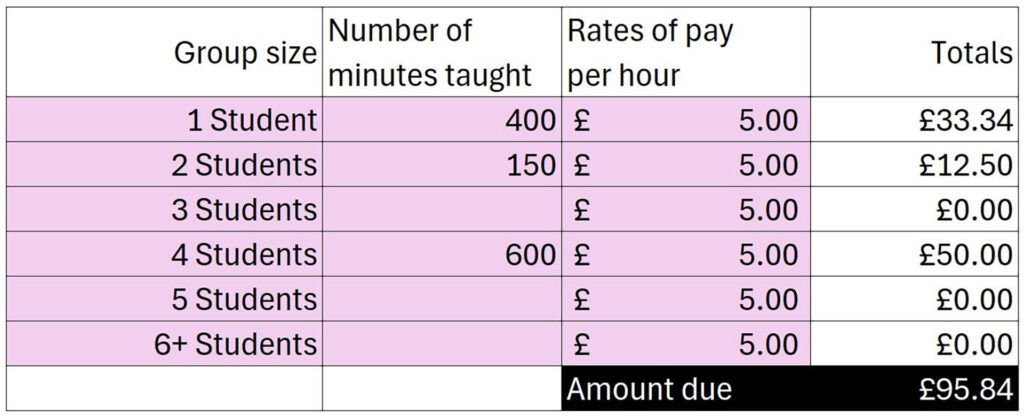
Suppose you had 2 blocks of just 1-to-1 – that is 2×200 = 400
1 block with 2 students but you missed 50 minutes due to a late train or similar 1×200 – 50 = 150
3 blocks with 4 students – that is 3×200 = 600
Please ensure you enter a number (don’t enter “200mins” for example) and if you didn’t teach 3 students leave that blank.
This would give the following – please note that the totals are calculated for you.
Please note that the rates of pay aren’t £5/hr this is just for illustrative purposes.
For blog writing invoice obviously just fill in the number of words.
Once you have completed the form then save it and send it as an attachment.
For blog writing and vacation course, including online which is part of those course send to: guido@oxss.co.uk and nick@oxss.co.uk.
For online tuition or year round which isn’t part of a vacation program send to: guido@oxss.co.uk and nicky.downey@oxss.co.uk.
Last updated 13th Jan 2026 @ 16:35